Architecture overview
DataFoundry uses a local-first workbench architecture. Web and TUI are user entry points; the backend unifies Agent Runtime, configuration management, data source access, knowledge retrieval, files, and artifact management.
High-level structure
Web workbench / TUI / other clients
  -> CopilotKit / AG-UI agent run
  -> REST configuration and resource API
  -> Agent Runtime
  -> Data Gateway / Knowledge / MCP / Skill / Files / Artifacts
  -> Metadata and audit storage
A curated architecture diagram is available in the repository home runtime flow image: docs/assets/readme/runtime-flow.png.
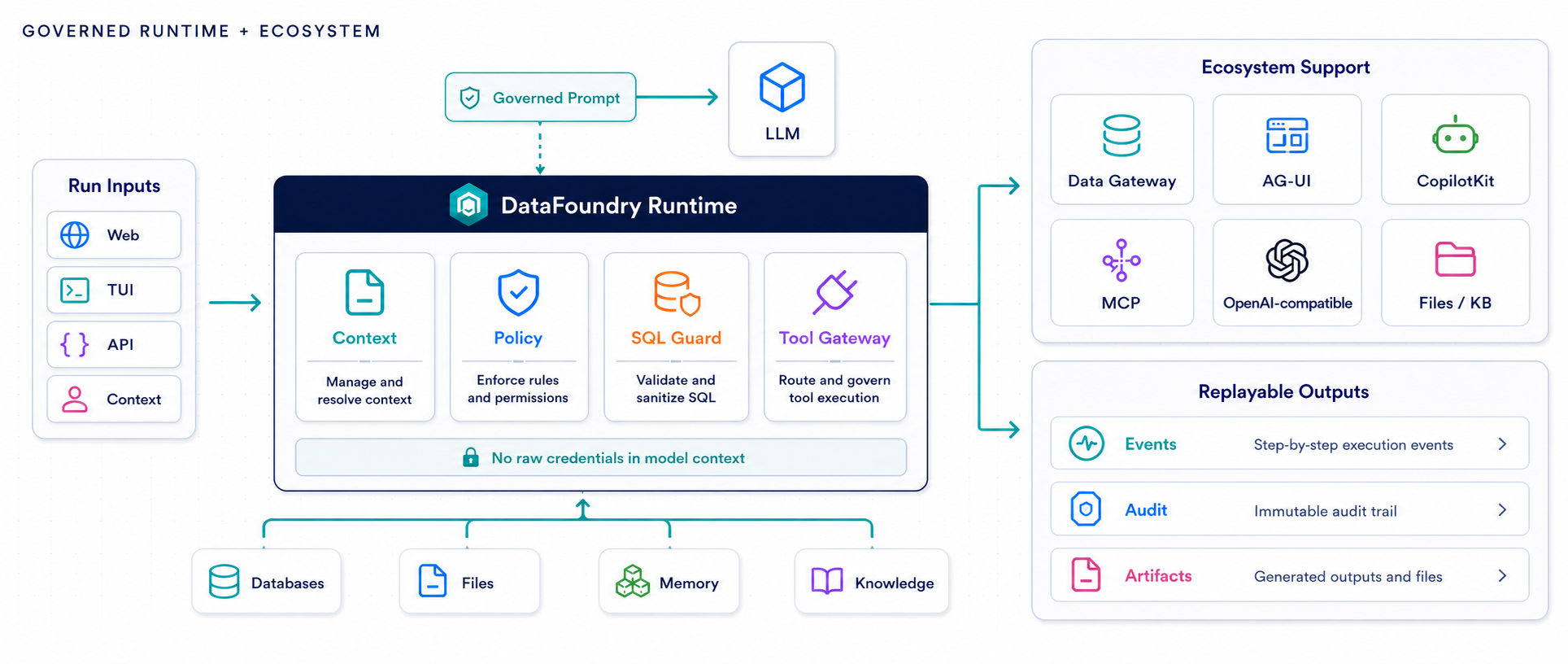
Main modules
| Module | Responsibility |
|---|---|
apps/web |
Web data task workbench: graphical conversation, resource management, trace, and outputs. |
apps/tui |
Terminal UI: CLI conversation, data source and Skill selection, stats, and outputs. |
apps/api |
Backend HTTP service: /api/copilotkit and /api/v1/*. |
| Agent Runtime | Creates DataFoundry, manages tools, run context, and AG-UI events. |
| Data Gateway | Data sources, schema checks, preview, and read-only SQL execution. |
| Knowledge | Knowledge base documents, chunking, retrieval, and citation boundaries. |
| MCP | External tool services with allowlist and timeout policy. |
| Skills | Parse, store, select, and materialize Skill packages in the run workspace. |
| Files | Reusable file assets and in-run file references. |
| Artifacts | Agent-generated tables, charts, reports, and downloadable files. |
| Metadata | Users, workspace, session, run, events, resource configuration, secret references, and audit records. |
Two northbound interfaces
The backend exposes two interface types to clients:
| Interface | Path | Description |
|---|---|---|
| Agent run | /api/copilotkit |
Start one agent analysis run; returns AG-UI event stream. |
| REST configuration API | /api/v1/* |
Manage workspace resources, files, tasks, outputs, and configuration. |
Web and TUI do not read backend internal SQLite, Data Gateway implementation classes, or Knowledge implementation classes directly. They interact only through HTTP.
Data analysis run flow
User asks a question
  -> Client sends AG-UI RunAgentInput
  -> Backend parses threadId, runId, messages, and run_config
  -> Merge workspace defaults, per-run overrides, and server policy
  -> Agent inspects schema
  -> Agent runs read-only SQL or calls other controlled tools
  -> Backend writes run events, SQL audit, and artifacts
  -> Client shows text, steps, trace, and outputs
Key points:
threadIdis the session;runIdis a single run.run_configselects data sources, models, knowledge bases, MCP, Skills, and files for this run.- The backend rebuilds authoritative server conversation history; clients do not resend full history on every run.
- The same AG-UI event stream is returned to the client and persisted for replay and audit.
Data access boundary
Data Gateway sits between the agent and real data sources. It handles:
- Data source registration and connection tests.
- Schema introspection.
- Preview and read-only SQL execution.
- SQL guard, limits, timeouts, allowlists, and field masking.
- SQL audit and result artifact creation.
Clients do not receive database credentials; the agent cannot bypass Data Gateway to access databases directly.
Configuration and credentials
Workspace configuration uses /api/v1/* REST APIs. Resource credentials are submitted only on create or update; the backend stores secret references and read APIs do not return plaintext.
Effective configuration for one run combines three layers:
This keeps left-panel workspace configuration, per-conversation selection, and backend security policy separate.
Identity scope
DataFoundry only supports cookie-based password sessions. Each registered user gets a personal workspace; Web v1 keeps workspace switching out of the UI and scopes browser state by user. REST configuration requests and CopilotKit AG-UI runs must use the same authenticated session.
/api/v1/auth/* covers registration, login, email verification, password reset, logout, and session revocation. Unsafe methods require CSRF checks.
Files, knowledge bases, and outputs
Files can be stored as reusable FileAssetRef or enter the session workspace as chat attachments. During agent runs, controlled workspace tools read files.
Knowledge bases are managed by backend services for documents, chunking, and retrieval. The agent sees only policy-controlled retrieval summaries and citations.
Artifacts are managed by the Artifact service—common types include tables, charts, SQL, reports, and files. Web suits preview, download, and export; TUI suits command-line viewing.
Formal deploy boundary
The default path is formal deploy (build / start); do not run npm run dev. Formal test and real production share the same start commands:
| Environment | Public URL | |
|---|---|---|
| Formal test | AUTH_EMAIL_DELIVERY=test |
Local / private |
| Real production | AUTH_EMAIL_DELIVERY=smtp |
Public HTTPS + reverse proxy |
The browser reaches REST and CopilotKit SSE through the same-origin Next BFF. Probes:
GET /healthz— process livenessGET /ready— Mastra and builtin resources ready (response includesstartup_ms/phases)
Reverse-proxy sample: deploy/nginx.datafoundry.conf.example — compress static assets; leave the SSE path uncompressed and unbuffered. Contributor hot-reload: Quick start appendix.
Real production typically also needs:
- Secret management such as KMS or Vault.
- Deployment, monitoring, and audit policies.
- Real-environment E2E validation against external databases.
- RBAC, organization policies, and multi-workspace UI if your deployment needs more than one personal workspace.
These do not block formal-test acceptance but should be evaluated before external delivery.